Remove shutdown option from the server.
Follow the given steps :
Go to group Policy > Computer Configuration > Window Settings > Security Settings > Local Policies > User Rights Assignments > Find (Shut down the System) option
Then Add or remove users as per client requirement except Mtpl_s (Our support ID must be added).
Note - For effecting the policy run given command or reboot the server.
cmd - gpupdate /force
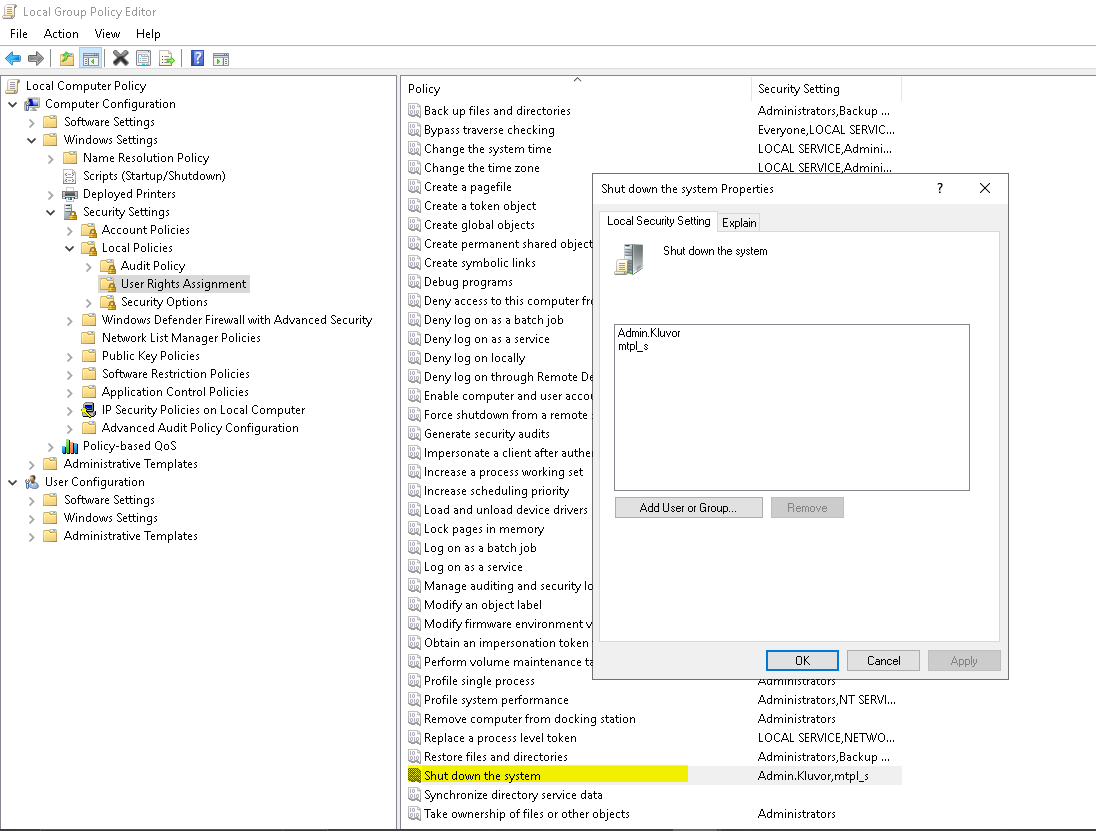
Go to group Policy > Computer Configuration > Window Settings > Security Settings > Local Policies > User Rights Assignments > Find (Shut down the System) option
Then Add or remove users as per client requirement except Mtpl_s (Our support ID must be added).
Note - For effecting the policy run given command or reboot the server.
cmd - gpupdate /force
Related Articles
How to Enable or Disable Copy-Paste (Clipboard Redirection) Using Group Policy in Windows Server
Purpose This guide explains how to enable or disable copy-paste functionality between a local computer and a Remote Desktop session by configuring Group Policy settings. Enable Copy-Paste (Clipboard Redirection) Step 1: Open Group Policy Editor Log ...Server was restarted automatically
Hi Sir, As discussed, I have disable schedule for updates check, No issue will be there from next time. Attached Screenshot.How to take TSplus backup.
Open the Admin tool 2. Go to ADVANCED option and click on Backup/Restore your server Parameter 3.Then click on Backup Now Done.Generate login Icon
How to Generate Icon for Login Open TSPlus (There is a common password to open the software) [ 0135790 ] Then go to Sessions and Client Generator In General Give Server Address or Domain name then give the Port Preferred display mode select Remote ...Enable File/Folder Delete Auditing in Windows Servers
Step 1 — Enable Audit Policy Method 1 (Recommended) Open: Run → secpol.msc Go to: Security Settings → Local Policies → Audit Policy Open: Audit object access Enable: ✅ Success ✅ Failure Click Apply → OK Method 2 (Advanced Audit Policy) Open: Run → ...